Table of Contents
Spines report observations to agents as nested dictionaries. This page uses shorthands a.b.c for nested dictionary keys observation["a"]["b"]["c"].
At each cycle, a spine first reads measurements from its sensors, then computes estimates from these measurements by applying observers one after the other, in a sequence called the observer pipeline. Simulation spines also report simulation-only quantities, such as the ground-truth state of the robot.Finally, the spine timestamps each observation with its time key, in seconds since the epoch.
Sensors
Sensors provide raw measurements to the spine. IMU and servo measurements are always reported, as they come from the robot itself. Other sensors pull measurements from host devices and files, and are only reported when enabled in the spine.
IMU
- Sensor: always reported
- See also: ImuData
- Spine observation key:
imu
| Observation key | Description |
|---|---|
angular_velocity | Body angular velocity of the IMU frame in rad/s |
linear_acceleration | Linear acceleration of the IMU, with gravity filtered out, in m/s² |
orientation | Orientation of the IMU frame in the ARS frame as a unit quaternion (w, x, y, z) |
raw_angular_velocity | Raw angular velocity measured by the gyroscope of the IMU, in rad/s |
raw_linear_acceleration | Raw linear acceleration measured by the accelerometer of the IMU, in m/s² |
The inertial measurement unit (IMU) mounted on the pi3hat combines an accelerometer and a gyroscope. These raw measurements are converted onboard by an unscented Kalman filter (based on a standard quasi-static assumption) that outputs observed quantities with respect to an attitude reference system (ARS) frame.
There are three main frames to keep in mind when considering the IMU: the frame of the IMU sensor itself, the world frame, and the attitude reference system (ARS) frame. The world frame is an inertial frame of reference we refer to in various observers. It has an x-axis pointing forward, a y-axis pointing to the left and a z-axis vertical and pointing up (i.e., against the gravity vector).
Servo
- Sensor: always reported
- Spine observation key:
servo
| Observation key | Description |
|---|---|
<servo_name> | Observations for a given servo, e.g. left_hip |
<servo_name>.d_current | D-axis current in A |
<servo_name>.fault | Fault code reported by the moteus controller (zero when there is no fault) |
<servo_name>.mode | Current mode of the moteus controller |
<servo_name>.position | Angle between the stator and the rotor in radians |
<servo_name>.q_current | Q-axis current in A |
<servo_name>.temperature | Temperature of the moteus controller board in °C |
<servo_name>.torque | Joint torque in N⋅m |
<servo_name>.velocity | Angular velocity of the rotor w.r.t. stator in rotor, in rad/s |
<servo_name>.voltage | Input voltage of the moteus controller board in V |
Actuators on the robot are qdd100 beta 3 (hips and knees) and mj5208 brushless motors (wheels). All of them have moteus controller boards that provide the above measurements. They are estimated as follows:
- Joint angle, sensed by two orthogonal Hall-effect sensors at the back of the moteus controller board (each measuring the magnetic field in one direction; the output angle is then the arc-tangent of the ratio between these two values)
- Joint velocity, obtained by filtering joint angle measurements (not a direct measurement)
- Joint torque, estimated from sensed phase currents (with a model that includes stator magnetic saturation)
Joystick
- Sensor: Joystick
- Spine observation key:
joystick
| Observation key | Description |
|---|---|
cross_button | Bottom button (cross on PS4, A on Xbox) |
left_axis | Left analog joystick position (x, y) |
left_button | Left button (L1 on PS4, L on Xbox) |
left_trigger | Left trigger position |
pad_axis | Directional pad position (x, y) |
right_axis | Right analog joystick position (x, y) |
right_button | Right button (R1 on PS4, R on Xbox) |
right_trigger | Right trigger position |
square_button | Left button (square on PS4, Y on Xbox) |
triangle_button | Top button (triangle on PS4, X on Xbox) |
Keyboard
- Sensor: Keyboard
- Spine observation key:
keyboard
| Observation key | Description |
|---|---|
key_pressed | Whether a keyboard key is currently pressed |
up | Whether the Up key is pressed |
down | Whether the Down key is pressed |
left | Whether the Left key is pressed |
right | Whether the Right key is pressed |
a | Whether the A key is pressed |
d | Whether the D key is pressed |
s | Whether the S key is pressed |
w | Whether the W key is pressed |
x | Whether the X key is pressed |
unknown | Whether an unknown key is pressed |
CPU temperature
- Sensor: CpuTemperature
- Spine observation key:
cpu_temperature
The observation is directly the CPU temperature of the spine host, in degrees Celsius.
Observers
Observers compute estimates from sensor measurements, and possibly from the outputs of previous observers in the observer pipeline. For instance, the wheel odometry observer relies on the output of the floor contact observer.
Base orientation
- Observer: BaseOrientation
- Spine observation key:
base_orientation
The base orientation observer estimates the orientation of the floating base with respect to the world frame.
| Observation key | Description |
|---|---|
angular_velocity | Body angular velocity vector of the base frame in rad/s |
pitch | Pitch angle of the base frame relative to the world frame, in radians |
rotation_base_to_world | Rotation matrix from the base frame to the world frame |
Floor contact
- Observer: FloorContact
- Spine observation key:
floor_contact
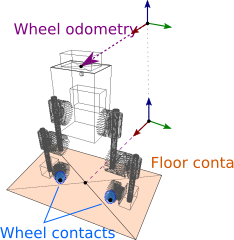
The floor contact observer detects contact between the wheels and the floor. The PID balancer used for testing relies on this observer, for instance, to reset its integrator while the robot is in the air, to avoid fast-spinning wheels at touchdown. Internally, it relies on two WheelContact observers, one for each wheel, whose outputs are reported under <wheel>, which is either left_wheel or right_wheel.
| Observation key | Description |
|---|---|
contact | Boolean contact state |
upper_leg_torque | Mean squared upper-leg torques in N⋅m |
<wheel>.abs_acceleration | Low-pass filtered absolute wheel acceleration in rad/s² |
<wheel>.abs_torque | Low-pass filtered absolute wheel torque in N⋅m |
<wheel>.contact | Contact state of the wheel (boolean) |
<wheel>.inertia | Apparent inertia at the wheel, i.e. absolute torque divided by absolute acceleration, in kg⋅m² |
Wheel odometry
- Observer: WheelOdometry
- Spine observation key:
wheel_odometry
This observer measures the relative motion of the robot with respect to the floor, outputting ground position and velocity estimates. These quantities are used for instance in the PID balancer, which tries to stay around the same spot on the floor.
| Observation key | Description |
|---|---|
position | Ground position in meters |
velocity | Ground velocity in m/s |
History observer
- Observer: HistoryObserver
- Spine observation key:
history(optional)
The history observer reports higher-frequency signals from the spine as vectors of observations to lower-frequency agents. It handles floating-point and vector-valued observations. For instance, to report the left-knee torque readings on an Upkie, create a shared-pointer as follows and add it to the observer pipeline of the spine:
The same syntax can be used for a vector like the IMU linear acceleration:
The history is then reported under the same keys prefixed by history, for instance history.servo.left_knee.torque in the first example.
Simulation
- Spine observation key:
sim
Simulation spines report the following additional observations, which are not observable on the real robot.
Floating base
- Spine observation key:
sim.base
Positions and velocities of the base frame:
| Observation key | Description |
|---|---|
position | Position of the base frame in the world frame, in meters |
orientation | Unit quaternion (w, x, y, z) of the orientation of the base frame in the world frame |
linear_velocity | Linear velocity from base to world in world, in m/s |
angular_velocity | Angular velocity from base to world in world, in rad/s |
IMU non-observables
- Spine observation key:
sim.imu
Non-observable quantities related to the IMU:
| Observation key | Description |
|---|---|
linear_velocity | Linear velocity of the IMU frame in the world frame, in m/s |
Rigid bodies
- Spine observation key:
sim.bodies
Coordinates of some rigid bodies in the world frame:
| Observation key | Description |
|---|---|
YYY | Positions and velocities of the extra body YYY |
YYY.position | Position of YYY in the world frame, in meters |
YYY.orientation | Unit quaternion (w, x, y, z) of the orientation of YYY in the world frame |
All observations
The following table lists all observation keys that spines can report, along with the section that details them. Placeholders in angle brackets depend on the robot or spine configuration: <servo_name> is a servo name such as left_hip, <body_name> is the name of an extra body in the simulation, and <keys> are the keys of a signal reported by a history observer. Observations from optional sensors are only reported when they are enabled in the spine, and simulation observations only by simulation spines.
| Key | Source |
|---|---|
base_orientation.angular_velocity | Base orientation |
base_orientation.pitch | Base orientation |
base_orientation.rotation_base_to_world | Base orientation |
cpu_temperature | CPU temperature |
floor_contact.contact | Floor contact |
floor_contact.left_wheel.abs_acceleration | Floor contact |
floor_contact.left_wheel.abs_torque | Floor contact |
floor_contact.left_wheel.contact | Floor contact |
floor_contact.left_wheel.inertia | Floor contact |
floor_contact.right_wheel.abs_acceleration | Floor contact |
floor_contact.right_wheel.abs_torque | Floor contact |
floor_contact.right_wheel.contact | Floor contact |
floor_contact.right_wheel.inertia | Floor contact |
floor_contact.upper_leg_torque | Floor contact |
history.<keys> | History observer |
imu.angular_velocity | IMU |
imu.linear_acceleration | IMU |
imu.orientation | IMU |
imu.raw_angular_velocity | IMU |
imu.raw_linear_acceleration | IMU |
joystick.cross_button | Joystick |
joystick.left_axis | Joystick |
joystick.left_button | Joystick |
joystick.left_trigger | Joystick |
joystick.pad_axis | Joystick |
joystick.right_axis | Joystick |
joystick.right_button | Joystick |
joystick.right_trigger | Joystick |
joystick.square_button | Joystick |
joystick.triangle_button | Joystick |
keyboard.a | Keyboard |
keyboard.d | Keyboard |
keyboard.down | Keyboard |
keyboard.key_pressed | Keyboard |
keyboard.left | Keyboard |
keyboard.right | Keyboard |
keyboard.s | Keyboard |
keyboard.unknown | Keyboard |
keyboard.up | Keyboard |
keyboard.w | Keyboard |
keyboard.x | Keyboard |
servo.<servo_name>.d_current | Servo |
servo.<servo_name>.fault | Servo |
servo.<servo_name>.mode | Servo |
servo.<servo_name>.position | Servo |
servo.<servo_name>.q_current | Servo |
servo.<servo_name>.temperature | Servo |
servo.<servo_name>.torque | Servo |
servo.<servo_name>.velocity | Servo |
servo.<servo_name>.voltage | Servo |
sim.base.angular_velocity | Floating base |
sim.base.linear_velocity | Floating base |
sim.base.orientation | Floating base |
sim.base.position | Floating base |
sim.bodies.<body_name>.orientation | Rigid bodies |
sim.bodies.<body_name>.position | Rigid bodies |
sim.imu.linear_velocity | IMU non-observables |
time | Timestamp |
wheel_odometry.position | Wheel odometry |
wheel_odometry.velocity | Wheel odometry |
